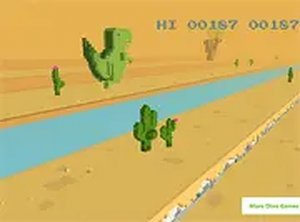
Desert Setting and Visual Style
Prehistoric Dash 3D places players in a bright, three-dimensional desert with warm sunlight and clear skies. The dinosaur itself uses a friendly, blocky design that matches the lighthearted tone. This visual approach keeps the game running smoothly on a range of devices without sacrificing a polished look.
Jumping Over Cacti
The dinosaur moves forward automatically, so the only control is a tap, click, or key press to jump. Cacti appear as obstacles, and clearing them requires timing rather than complex inputs. As a run continues, the game gradually increases speed, shortening the window for each jump and demanding quicker reactions. There are no other moves to learn, which keeps the experience accessible.
Browser Play and Input Options
The game runs directly in a web browser with no downloads or installations. It adapts to touch, mouse, or keyboard input, so phones and desktop computers both work. A full-screen mode is available for a more focused session. Because starting a run takes only seconds, the game fits easily into short breaks.Distance Scoring and Replay
Each run tracks how far the dinosaur travels, giving players a clear target to beat. The rising speed means timing shifts over time, so no two attempts feel identical. This scoring loop encourages repeated plays as players try to extend their distance and sharpen their reaction times.Editorial Notes
Compatibility
This H5 game runs smoothly on:
• Desktop computers (Windows / Mac) • Mobile phones (iPhone / Android)
• Tablets (iPad / Android)
🌐 Best experienced with Chrome, Safari, or Edge





Comments
0 comments