Rounding Numbers Math Puzzle
Review
Rounding Numbers Math Puzzle turns a common math drill into an engaging puzzle game. The drag-and-drop x-ray mechanic is intuitive and keeps players focused. It is free, works on any device, and requires no downloads. Ideal for parents and teachers looking for a safe, educational activity. The simple design helps learners build confidence with rounding numbers.
About this game
Game Introduction
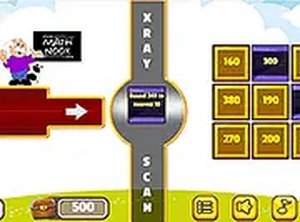
Rounding Numbers Math Puzzle is an educational game that makes practicing rounding numbers feel like solving a puzzle. The game presents a series of squares on the left side of an x-ray bar. Each square hides a rounding problem. Players click and drag a square onto the bar to reveal the problem. After solving it, they drag the square to the matching answer on the right side. This unique mechanic turns math practice into a puzzle, making learning feel like a game rather than a drill. Designed for all ages, it runs directly in the browser with no downloads or installations required. Full screen mode is available for a more focused experience. Whether at home or on the go, this game turns math practice into an engaging activity. It is ideal for parents, teachers, and anyone who wants to improve rounding skills in a playful way.
How to Play
Start by looking at the squares on the left side of the x-ray bar. Click on any square and drag it onto the bar. The square will reveal a rounding problem. Read the problem and determine the correct rounded answer. Then, drag the square from the x-ray bar to the square on the right side that shows the answer you chose. If the match is correct, you earn points and move to the next problem. The game is simple to learn but offers a rewarding challenge as you progress. You can play using a mouse on desktop or touch screen on mobile devices. Full screen mode is supported for a better view. The key is to think carefully about rounding rules and make accurate matches. Enjoy the process and have fun learning math.
Game Features
Family-friendly and educational. Unique x-ray mechanic that reveals problems interactively. Free to play with no downloads required. Works on desktop and mobile browsers. Full screen mode for immersive play. Simple drag-and-drop controls suitable for all ages. Helps reinforce rounding rules through practice.
Tips for Success
Take your time to read each rounding problem carefully. Remember the basic rounding rules: look at the digit to the right of the place you are rounding to. If it is 5 or greater, round up; if it is less than 5, round down. Practice regularly to improve speed and accuracy. Use full screen mode to minimize distractions. Try to make matches quickly but accurately to earn more points. If you make a mistake, learn from it and move on. The more you play, the better you will become at rounding numbers.





Comments
0 comments