Monthly Styling Prompts
Seasonal Mermaid Style Studio organizes its dress-up play around a calendar. You select any month, and that choice sets the tone for the outfit you build. January leans toward cozy, layered pieces, while July favors light, airy combinations. The structure asks you to think about how clothing changes with the seasons, from soft spring pastels to autumn's warmer palette. Because each month carries its own prompt, two styling sessions rarely feel identical. The calendar is not a progression gate; it is a creative constraint that gives each design a starting point.
Wardrobe and Character Customization
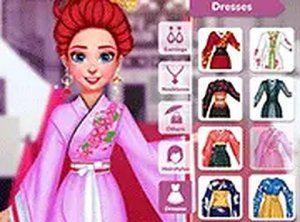
The game supplies a broad wardrobe: tops, bottoms, dresses, and outerwear form the base of an outfit, while jewelry, headpieces, and scarves add detail. You can also change the character's hairstyle to match the look. Browsing and selecting items is built for speed, so you can test combinations without fighting the interface. Mixing pieces lets you create either a cohesive seasonal statement or a deliberate contrast. The range of categories means you are making real choices about silhouette, color, and accessory placement rather than picking one preset outfit.
Scene and Background Design
After assembling the outfit, you choose a background scene that fits the seasonal theme. A winter setting might show snow-covered shores, while a summer scene could feature sunny beaches with blooming flowers. Swapping backgrounds changes how the final image reads, turning a simple outfit into a complete portrait. This step also nudges you to consider how environment shapes fashion choices. The background is not decoration alone; it is part of the design decision.
Saving, Sharing, and Access
Finished designs can be saved or shared, letting you build a gallery of outfits over time. Sharing opens the door to inspiration from other players, forming a small community around the styling prompts. No registration or download is required, so returning to saved work or starting a new month is immediate. The game runs in desktop and mobile browsers, with controls suited to both mouse and touch input. That makes it practical for a short creative break or a longer session.




Comments
0 comments