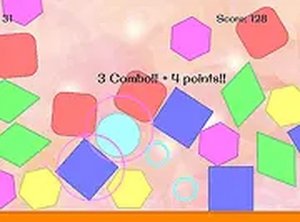
Core Matching Mechanic
The game presents a board filled with colored shapes. Your task is to find two figures sharing the same color and click each one to eliminate the pair. There are no complex rules to memorize; the challenge comes from spotting matches quickly and executing clicks without hesitation. Each successful pair clears space on the board, but the timer keeps pressure on.
Combo Timing and Scoring
Speed directly affects your score. Matching pairs in rapid succession builds a combo, and each combo doubles the points earned from that match. This means a fast player who chains several matches together will outscore someone who finds pairs slowly, even if both clear the same number of shapes. Planning clicks in advance and targeting pairs that sit close together helps maintain combo momentum.
Session Structure and Controls
Twins Pop Color Match Puzzle runs entirely in a desktop browser with mouse input. Left-click a shape to select it, then click its matching color counterpart to erase both. The game supports full screen mode, which reduces visual distractions and can help you focus on the board. No installation or account setup is needed, so a session can start within seconds.
Who This Suits
Because the rules take only a moment to grasp, the game works well for short breaks or warm-up sessions. Players who enjoy observation-based puzzles and score chasing will find the combo system gives them a reason to replay and improve. The timer prevents sessions from dragging, though players seeking a completely relaxed experience without time pressure should note that urgency is central to the design.



Comments
0 comments