Retro Arcade Feel
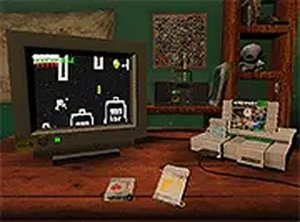
Cocoboy Classic Platformer Adventure recreates the look and feel of a 1990s console platformer, complete with a nostalgic aesthetic that mimics playing on an old-school TV. The game runs directly in a desktop browser, so there is no download or installation step. Its visual style and simple controls are designed to appeal to players who grew up with classic arcade and console games, as well as younger players encountering the genre for the first time.
Core Objective and Controls
Each level asks you to guide a cheerful character from the starting point to an end flag. Along the way, you jump over obstacles and collect items that increase your score. Movement uses the arrow keys or WASD, while the spacebar or up arrow triggers a jump. Timing matters: obstacles require well-timed jumps, and observing enemy patterns helps you avoid unnecessary mistakes. The game is best played on a desktop computer with a keyboard, and a full-screen button is available for a larger view.
Collecting and Exploring
Items scattered through each stage serve as both a score boost and a reason to explore. Rushing to the flag may leave points behind, while careful exploration can reveal helpful patterns in enemy movement and platform layout. The game does not specify a fixed number of levels, but the design supports increasing difficulty as you progress. Because obstacles and items are family-friendly, the challenge stays accessible for casual players while still offering a satisfying test of reflexes and observation.
Approach to Difficulty
Cocoboy Classic Platformer Adventure leans on pattern recognition and patience rather than complex mechanics. Regular practice improves your timing and familiarity with each level's layout. Using full-screen mode can make obstacles easier to see, and taking a moment to study enemy routes before moving often prevents avoidable deaths. The overall experience is relaxed but not mindless: players who enjoy vintage platformers will find a familiar rhythm, while newcomers can learn at their own pace.





Comments
0 comments