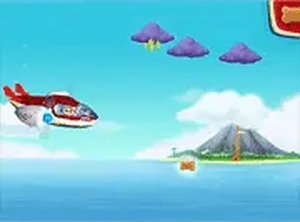
Core Flying and Collecting
In Paw Patrol Sky Flight Journey, the player controls an airplane using mouse or touch input. The main goal is to collect bone biscuits and bananas scattered through the sky. Animals appear along the route, and the game expects players to avoid them without causing harm. That design choice turns simple movement into a light precision exercise: grabbing treats often means adjusting course, but not so sharply that you clip an animal. The game runs in a browser and supports full-screen mode, so no downloads or installations are needed.
Level Progression and Difficulty
Each level introduces new challenges and collectibles. Because the game is built for young children, the difficulty curve stays gentle, but later stages still ask for steadier control and quicker reactions. The layout of each level matters: treats and animals are placed so that collecting everything requires planning a route rather than flying randomly. Progression is tied to completing these levels, and the collectible types remain consistent, which helps kids recognize goals without reading instructions.
Controls and Accessibility
The controls are deliberately simple. Moving the mouse or dragging a finger steers the plane, and there are no complex button combinations. This makes the game accessible to young players who may not be comfortable with keyboard controls. The interface stays out of the way, and the colorful graphics keep the focus on the plane, the treats, and the animals. Because it works on both desktop and mobile browsers, a session can start instantly without registration or payment.
Playing with Patience
Rushing usually leads to collisions with animals, so the game rewards smooth, steady flying. Players who watch the level layout before moving quickly tend to collect more treats. The emphasis on not hurting animals fits the Paw Patrol series' positive tone, and it gives parents a reason to feel comfortable with the content. Regular play can help improve hand-eye coordination and reaction speed, especially for younger children who are still learning to control a cursor or touch screen.




Comments
0 comments