Minesweeper Classic Puzzle

Minesweeper Classic Puzzle

Minesweeper Classic Puzzle is a free online logic game where you clear a grid by using numbered clues to find hidden items. Play in your browser with no download needed.

PLAY NOW

Update Time

2026-07-04

Publisher

Survival Pixel Core

Release Date

2024-08-03

Tags

Arcade , Classic , Puzzle

Rating

Platform

Html5


Reviews

A clean, free logic puzzle that sharpens your mind with every move. Perfect for quick mental exercise.

About this game

Game Introduction

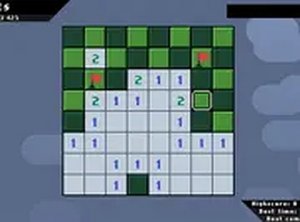
Minesweeper Classic Puzzle is a timeless logic puzzle that challenges players to clear a grid of squares without uncovering hidden items. The objective is straightforward: reveal all safe squares while using numbered clues to deduce the locations of hidden items. Each number on a revealed square indicates how many hidden items are adjacent to that square, helping players plan their next moves. This classic game has been a favorite for decades, offering endless mental stimulation and rewarding gameplay. It is a family-friendly experience suitable for all ages, providing a clean and engaging challenge that requires careful thinking and strategy. Players can enjoy the game for free directly in their browser without any downloads. The game is known for its simple yet deep mechanics, making it accessible to newcomers while still offering a satisfying challenge for experienced players. The core appeal lies in the logical deduction required to succeed, as each move involves analyzing clues and making calculated decisions. Minesweeper Classic Puzzle is a perfect choice for anyone looking to exercise their mind in a safe and enjoyable environment.

How to Play

To play Minesweeper Classic Puzzle, players begin by clicking any square on the grid to reveal a number or an empty area. Numbers indicate how many hidden items are adjacent to that square. Players can use this information to mark squares they believe contain hidden items by placing flags. The goal is to uncover all safe squares without revealing any hidden items. If a player clicks on a square with a hidden item, the game ends. Players must use logic to deduce where hidden items are located, planning each move carefully. The game is designed for desktop play with a mouse or keyboard for precise control. It is free to play and runs instantly in the browser, requiring no installation. The interface is simple and intuitive, allowing players to focus on the puzzle without distractions.

Game Features

Minesweeper Classic Puzzle offers a classic logic puzzle experience with numbered clues that guide player strategy. It includes a flagging system that allows players to mark suspected locations of hidden items. The game is available for free in the browser with no download required. It features a family-friendly design that is safe for all ages. The grid-based layout provides a clean and focused gameplay environment. The game may include adjustable difficulty settings to suit different skill levels, though this is not guaranteed. The core features are centered around logical deduction and careful planning, making it an excellent choice for puzzle enthusiasts.

Tips for Success

Start by clicking in the center of the grid to maximize the area revealed. Use the numbers to identify safe squares and mark potential hidden item locations with flags. When confident a square is safe, click it to reveal more clues. Practice regularly to improve pattern recognition and speed. Remember that every move involves risk, so take your time and think carefully before clicking.

✅ Compatibility & Testing

• Desktop (Windows 11, macOS Ventura)
• Mobile (iPhone 14, Samsung Galaxy S23)
• Tablet (iPad Pro, Android tablet)
✅Supported browsers: Chrome, Safari, Edge, Firefox (latest versions)
❌ Not supported: Internet Explorer, older browser versions

Advertisement

Faq

Is Minesweeper Classic Puzzle free to play?
Yes, the game is completely free to play. You can enjoy it directly in your browser without any payment or subscription. There are no hidden costs or in-app purchases required to access the full experience.
Can I play Minesweeper Classic Puzzle on my mobile device?
The game is primarily designed for desktop play with a mouse or keyboard. While it may work on some mobile browsers, the experience is optimized for larger screens and precise clicking. For best results, play on a computer or laptop.
What happens if I click on a hidden item?
If you click on a square that contains a hidden item, the game ends immediately. You will need to start a new game. This is part of the challenge, as each move requires careful thought and logical deduction to avoid ending the game.
How do I mark a square with a flag in Minesweeper Classic Puzzle?
To mark a square you suspect contains a hidden item, you can place a flag on it. This is typically done by right-clicking on the square with a mouse. The flag helps you remember which squares to avoid clicking, making it easier to clear the rest of the grid safely.
Are there different difficulty levels in Minesweeper Classic Puzzle?
The game may include adjustable difficulty settings, such as different grid sizes or numbers of hidden items, to suit various skill levels. However, the exact options depend on the specific version you are playing. Beginners can start with smaller grids, while experts may prefer larger ones.
Does Minesweeper Classic Puzzle require an internet connection to play?
Since the game runs in your browser, you need an internet connection to load it initially. Once loaded, the game may work offline depending on how it is implemented. For reliable play, it is best to have a stable internet connection.

Follow Us

Guess You Like