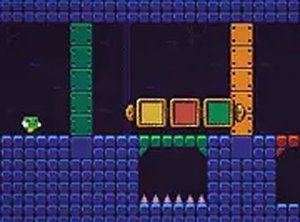
Automatic Movement and Color Switching
In Color Shift Puzzle Adventure, you do not steer the creature directly. It moves forward on its own, so your only control is deciding when and how to change wall colors. Press the space bar to open the color switcher, then click a color to remove walls of that color. The wrong choice can leave a barrier in place or expose a hidden trap, which restarts the level. Every decision is a timing call as much as a color call.
Reading the Level Layout
Each level is built from colored walls that block the path. Because you can only remove walls that match your selected color, you must scan the route ahead and pick the color that opens the safest line to the exit portal. Hidden traps sit throughout the levels, and touching one sends you back to the start. As you advance, more colors appear and trap placements become less predictable, so observation matters as much as speed.
Controls and Browser Access
Color Shift Puzzle Adventure runs directly in your browser with no download required. The control scheme is limited to the keyboard and mouse: space bar to open the color switcher, mouse click to choose a color. A full-screen button on the game screen lets you enlarge the play area, which can make distant wall colors easier to distinguish.
Difficulty Curve and Session Length
The game starts with straightforward color choices and gradually introduces new color patterns and trap arrangements. Short levels make it easy to play in brief sessions, while the restart-on-trap rule means mistakes cost only the current attempt. The result is a puzzle that rewards careful observation and planning more than fast reflexes.




Comments
0 comments