Candy Challenge: Obstacle Course Adventure
Review
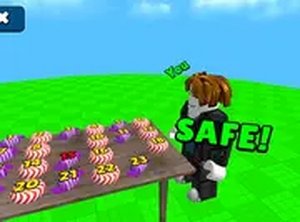
Candy Challenge: Obstacle Course Adventure offers a delightful blend of platforming and puzzle elements. The bright visuals and simple controls make it accessible for all ages. The co-op mode adds a fun teamwork element, while the increasing difficulty keeps players engaged. A great choice for casual family gaming.
About this game
Game Introduction
Candy Challenge: Obstacle Course Adventure places you in a bright, candy-filled world where danger hides in plain sight. What looks like a sweet treat can cause your character to lose progress on contact. You must jump across moving platforms, avoid tricky candy pieces, and navigate shifting obstacles to reach the end of each stage. The game combines platforming action with light puzzle elements, requiring timing and focus. You can play alone or team up with a friend in two-player mode. Each level introduces new environmental hazards, such as disappearing blocks and shifting paths, keeping the experience fresh. The vibrant graphics and smooth controls make it suitable for players of all ages, offering a safe and family-friendly gaming experience. The core objective is to reach the finish line by overcoming each obstacle with careful planning and precise movements.
How to Play
Players control their character using keyboard keys or on-screen controls to move left and right. A jump button allows characters to leap between platforms and avoid the tricky candy scattered along the path. In two-player mode, each player controls their own character, and coordination is needed to overcome obstacles together. Some levels feature moving blocks that require precise timing, while others have platforms that vanish after a few seconds. Staying alert and planning a route ahead helps progress through each stage. The game is easy to learn, but later stages demand careful timing and teamwork. Practice each level to master the patterns and reach the finish line.
Game Features
Colorful and inviting graphics create a cheerful atmosphere. Solo and co-op modes offer flexibility for different play styles. Dynamic obstacles like moving blocks and disappearing platforms keep each level challenging. Simple controls make the game accessible to younger players. Levels increase in difficulty gradually, providing a satisfying learning curve. The game runs smoothly in a browser with no downloads needed.
Tips for Success
Focus on timing your jumps carefully, especially when dealing with moving platforms. Watch for patterns in obstacle placement and memorize them to plan your route. In two-player mode, communicate clearly with your partner to coordinate movements. Take your time on tricky sections—rushing often leads to mistakes. Practice each level repeatedly to improve your reflexes and learn the layout. Stay patient, as later stages require both precision and teamwork.



Comments
0 comments