Multiplication as a Reflex Test
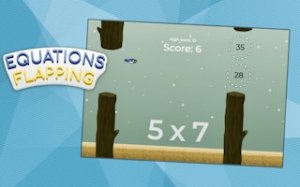
The equation appears on screen while the bird is already moving. You read it, scan the gaps ahead, and steer toward the one labeled with the correct product. There is no pause button and no separate answer screen — the math and the flying happen at the same time. That overlap is the whole design: multiplication facts become something you act on rather than something you write down.
One-Tap Flight Control
Holding a tap or click makes the bird flap upward; releasing lets it descend. Height control is continuous, so small adjustments matter more than large ones. The bird does not move sideways on its own — forward motion is constant, and your only input is vertical. Steering toward a gap therefore means timing your taps so the bird arrives at the right height when the obstacle reaches it.
Scoring and Rising Speed
Each correct gap adds one point. The game speed increases gradually, which shortens the window for reading the equation and reacting to it. Early on, there is enough time to calculate deliberately. Later, players who have not memorized their multiplication tables tend to hesitate, and hesitation usually means a collision. The score is a direct measure of how many equations you cleared, not a bonus system.
Who Gets the Most From It
Because the rules fit in a sentence, the game suits short sessions — a few minutes of practice between other tasks. Players still building multiplication fluency get the most obvious benefit, since the game rewards recall speed rather than written working. The clean visuals keep attention on the equation and the gaps. It runs in a browser on desktop and mobile, so the same session works on either device.



Comments
0 comments