Targeting Moving Produce
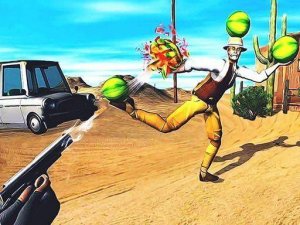
Melon Aim Trainer asks one thing of the player: keep a reticle on fruit as it moves and tap when the timing is right. Watermelons, oranges, and other produce bounce and roll across a clean background. Each fruit follows a natural path, so the challenge comes from reading that motion rather than reacting to random jumps. The visual style stays bright and uncluttered, which keeps attention on the targets instead of the scenery. [IMG_1]
Scoring and Difficulty Curve
Hits near the center of a fruit earn more than edge hits, so the scoring system favors precision over raw speed. As players progress, fruit accelerates and takes more complex routes. Later stages add multiple fruits on screen at once, forcing a decision about which target to prioritize. The difficulty rises gradually, which supports longer concentration without sudden spikes in frustration.
Focus and Coordination Practice
The game trains a specific split-attention skill: tracking a moving object while controlling a separate aiming mechanism. That combination appears in many real-world tasks, from sports to driving. Regular sessions can improve reaction time and the ability to hold focus for longer stretches. Because the core loop is simple, players can measure their own progress through score consistency rather than story milestones.
Controls and Session Length
A clear reticle and a simple score display make up the interface. Controls respond on both mouse and touchscreen, so the game works on desktop and mobile without a learning curve. There are no complex menus or distracting animations between attempts. That design suits short breaks as well as extended practice, and it lets players restart immediately after a miss.


Comments
0 comments