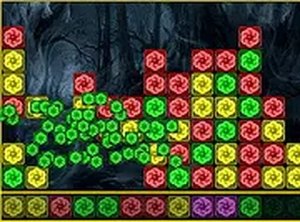
Matching Mechanics and Scoring
The board is filled with colorful blocks, and your task is to find groups of two or more blocks that share the same color and touch horizontally or vertically. Clicking any block in a valid group removes it and awards points. Group size determines the reward: larger clusters yield higher scores. A status bar at the bottom shows the potential score for the group under your cursor, so you can compare moves before committing.
Reading the Board
Each move changes the board layout. Removing blocks can split existing groups or create new connections, which affects what is available next. The game ends when the board fills up completely. Because the board does not refill automatically, planning several moves ahead helps you avoid leaving isolated blocks that cannot be cleared. The status bar acts as a decision aid, but it does not guarantee a good outcome if you ignore the overall shape of the board.
Access and Session Length
Color Block Collapse Puzzle runs directly in a browser on both mobile and desktop, with no download required. Progress is saved automatically, so you can close the tab and continue later. A full-screen mode is available. The controls are simple enough to learn in seconds, and the classic arcade presentation keeps the focus on the board rather than on menus or story elements. Sessions can be as short as a few minutes, which suits quick breaks.
Practical Tips
Prioritize larger groups when possible, but do not ignore smaller clears that open up better connections. Use the status bar to compare two or three candidate moves before clicking. If the board is getting crowded, clear blocks near the edges first to reduce the chance of trapping isolated colors. Regular play improves pattern recognition, and taking a moment before each click often leads to higher scores than rushing.


Comments
0 comments