Space Harvesting Basics
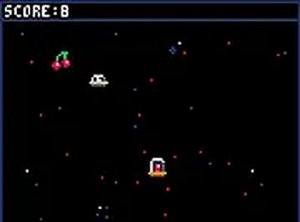
You control a flying saucer in a space setting. Fruit items appear on the screen, and your job is to collect them by steering the saucer into them. Each fruit adds to your score. Obstacles also cross the screen, and hitting one ends your run or costs you progress. The core loop is simple: move, collect, dodge, repeat.
Controls and Input
Cosmic Fruit Chase supports keyboard or mouse controls. With the keyboard, you typically use arrow keys or WASD to move the saucer in four directions. With the mouse, you move the saucer by pointing and clicking or by moving the cursor. The game is designed for desktop play, so a keyboard and mouse are the intended input methods. No downloads or installations are required; the game runs directly in a web browser.
Increasing Challenge
The game starts at a manageable pace. As you collect fruit and your score rises, the game speeds up and more obstacles appear. This progressive difficulty means early seconds are about learning the layout, while later seconds demand faster reactions and better anticipation. The challenge is not about complex rules but about executing simple actions under rising pressure.
Scoring and Session Flow
Your only score source is fruit collection. There are no power-ups or bonus multipliers mentioned, so every point comes from grabbing fruit. Because obstacles become denser and faster, the practical limit of a run depends on how long you can avoid collisions while still collecting. Sessions can be short or extended, depending on how long you survive. A full-screen mode is available for a more focused view.



Comments
0 comments