Firing Cats and Merging Sizes
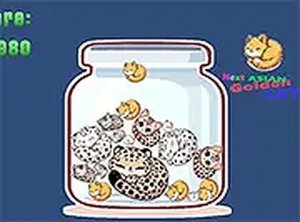
Cat Merge Puzzle is built around a single repeating action: aim a cannon, fire a cat, and let it collide with another cat of the same size. When two identical cats touch, they combine into one larger cat. That larger cat then becomes the target for the next merge. The chain starts with the smallest cat and continues upward, with each successful combination producing a bigger feline. The ultimate objective is to reach the largest cat the game allows. Because every shot changes the layout, you are constantly reading the board and deciding where the next cat should land.
Controls and Desktop Play
The game uses a mouse or keyboard to adjust the cannon's firing position. A single button press launches the cat toward the existing group. This control scheme is simple enough that new players can start firing within seconds, but the placement of each cat matters. A shot that misses its match adds another obstacle to the play area, while a well-placed shot clears space and sets up future merges. The game is best played on a desktop with a keyboard or mouse, and full screen mode is supported for a larger view of the board.
Relaxed Pace, Strategic Aim
Despite the arcade label, the pace is unhurried. There is no timer forcing quick decisions, so you can study the arrangement of cats before firing. The challenge comes from predicting where a cat will land and how it will settle against the others. Planning two or three merges ahead keeps the board from filling up with mismatched cats. The cute graphics and merge effects provide clear visual feedback, making each combination feel satisfying without adding pressure.
Who This Suits
Cat Merge Puzzle is designed for players of all ages. Its simple rules and stress-free loop make it suitable for short breaks or longer sessions. If you enjoy classic merge mechanics and prefer a calm, casual experience over fast reflexes, this game fits that preference. The free-to-play browser format means no download is required, and the full screen option helps if you want a more focused view.

Comments
0 comments