How the Merging Works
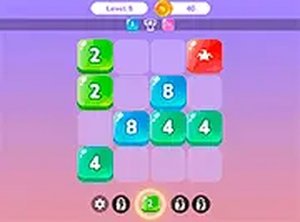
Merge Squares is built around a single clear action: click and drag numbered squares on a board. When two squares that share the same number touch, they combine into one square. That merged square then carries a higher value, which becomes the starting point for the next combination. The board is not static; every merge changes the available space and the possible connections. The challenge is not in performing the merge but in arranging the board so that the right squares end up next to each other.
Planning Each Move
Each level presents a unique puzzle with a specific goal to achieve. Because moves are not timed, the game rewards thinking several steps ahead rather than quick reactions. A useful approach is to start with the smaller numbers and build upward, since combining low values creates the larger squares you will need later. Players who move squares randomly often reach a board state where no further merges are possible, so the real skill lies in reading the layout before dragging anything.
Controls and Access
Merge Squares is played on a desktop computer using a mouse or keyboard for precise control. The entire game runs in a browser with no downloads or installations, so a session can start immediately. A full-screen mode is available for players who want fewer distractions and a clearer view of the board. The interface is intentionally simple, keeping attention on the puzzle rather than on menus or timers.
Who It Suits
This is a family-friendly game with no violent or inappropriate content, suitable for all ages. It works equally well as a short break activity or a longer session, depending on how many levels you attempt. Puzzle enthusiasts who enjoy logic and pattern recognition will find the most to work with, but the rules are simple enough for casual players to pick up without instruction. The absence of time pressure makes it a calm mental workout rather than a stressful one.




Comments
0 comments