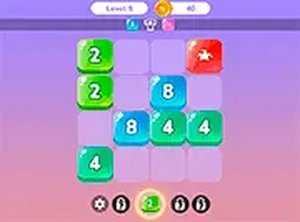
Game Introduction
Merge Squares is an arcade puzzle game that challenges logical thinking and strategic planning. The core objective is to connect squares with the same numbers, merging them into a single square. Each level presents a unique puzzle that requires careful thought to solve. The game is family-friendly and safe for all ages, with no violent or inappropriate content. It offers a calm yet engaging mental workout, perfect for short breaks or longer play sessions. Whether you are a puzzle enthusiast or just looking for a relaxing challenge, Merge Squares provides a rewarding experience.
How to Play
To play Merge Squares, use your mouse to click and drag squares on the board. Arrange them so that squares with the same number touch each other, causing them to merge into one. Plan your moves carefully, as each level has a specific goal to achieve. The game is played on a desktop computer using a keyboard or mouse for precise control. You can also play in full screen mode for a more immersive experience. Start by connecting smaller numbers and work your way up to larger combinations. The key is to think ahead and use logic to solve each puzzle efficiently.
Game Features
Merge Squares offers fun logic puzzles that challenge your brain. The gameplay is family-friendly and suitable for all ages. It is free to play online with no downloads required. Controls are simple, using mouse or keyboard. Full screen mode is available for better focus. The game runs directly in your browser, making it easy to start without any installations. Each level presents a new puzzle, encouraging logical thinking and strategic planning.
Tips for Success
To succeed in Merge Squares, practice regularly to improve your pattern recognition and planning skills. Focus on merging smaller numbers first to create larger combinations. Always think several moves ahead to avoid getting stuck. Take your time—there is no time pressure, so careful planning is key. Learn from each puzzle to develop better strategies. If you find a level difficult, try different approaches to see what works best. Consistent practice will help you solve puzzles more efficiently and enjoy the game even more.


Comments
0 comments