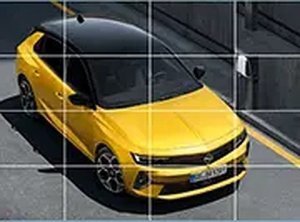
Game Introduction
The Opel Astra Puzzle Challenge is a sliding puzzle game that combines the appeal of automotive design with classic puzzle mechanics. The core objective is to rearrange scrambled pieces of an Opel Astra car image by sliding them into an empty space until the original picture is restored. This game offers a calming yet engaging experience that helps sharpen cognitive skills like spatial reasoning and patience. It is designed to be accessible directly in your browser, with no downloads required, and works smoothly on both desktop and mobile devices.
How to Play
To play, you start by selecting one of the three available Opel Astra images. Then you choose a difficulty level: 3x3 pieces for a quick challenge, 4x4 for a moderate test, or 5x5 for a more complex puzzle. The puzzle pieces are scrambled automatically. Your goal is to slide the pieces into the empty space to recreate the original picture. You click or tap on a piece adjacent to the empty space to move it. The game tracks your moves and time, allowing you to monitor your progress or compete with friends. You can also switch to full-screen mode for a more immersive experience.
Game Features
Features include three beautiful Opel Astra images to choose from, three difficulty modes (3x3, 4x4, and 5x5), a mobile-friendly design with touch controls, full-screen mode for better focus, and free play with no ads or in-app purchases. The game also tracks moves and time for self-improvement.
Tips for Success
To succeed, start with the 3x3 grid to learn the mechanics. Focus on completing one row or column at a time. Use the empty space strategically to move pieces. Practice regularly to improve your speed and spatial reasoning. For larger puzzles, try solving the edges first to create a frame.




Comments
0 comments